Bridging case management, built from the ground up.
Archway runs bridging as its own product, not a mortgage record with extra fields. Capture the deal and the exit, compare products, draft the suitability letter from your template and clear every condition to completion, all on one case your whole team can see.
Liam O’Connor · Bridging
Loan
£420,000
Gross LTV
65.6%
Term
12 months
Monthly rate
0.79%
Exit
Exit strategy
Sale of the property within 9 months
Fallback exit
Refinance onto a buy-to-let mortgage
Conditions
- Valuation instructed
- Legal pack reviewed
- Auction completion in 21 days
Next: chase the solicitor for the completion statement
Sample case data.
Built in, not bolted on
Most CRMs bolt bridging on. We built it in.
Other CRMs treat bridging as a residential mortgage with a different product type: a dropdown, a few extra fields, and the real work left in spreadsheets and lender portals. Archway was built for bridging from the ground up, with its own data, stages, quoting and compliance.
Bridging bolted on
- A mortgage record with a bridging product type
- Exit strategy kept in a free-text note, if at all
- Quotes run in lender portals and pasted back in
- The same compliance checklist for every bridge
- Auction deadlines and works tracked in spreadsheets
Bridging built in, with Archway
- A bridging case with its own data, stages and statuses
- Exit strategy and a fallback exit built into the case
- Quick quotes and full quotes run from the case itself
- Compliance shaped to each type of bridge from the start
- Deadlines, works and conditions tracked as actions
Built for the broker
Every stage of a bridge, in the order you work it.
Bridging moves fast and turns on details. Archway starts each stage with what the last one captured, so nothing is rekeyed and anyone on the team can pick up the deal and know exactly where it stands.
- 01
Deal structure
Capture the deal properly.
Regulated or unregulated, first or second charge, open or closed, and who is borrowing, from individuals to SPVs.
- 02
Exit strategy
Plan the way out first.
Record the exit and a fallback before you recommend anything, so the case is built around repayment.
- 03
Sourcing
Compare products like for like.
Monthly rate, interest treatment, fees and LTV side by side, against the deal you have captured.
- 04
Suitability letter
Draft from your template.
The deal, product and exit drop into your firm’s verified template, ready for the adviser to edit.
- 05
Underwriting
Clear every condition.
Valuation, legal pack, title and lender conditions tracked as actions with an owner and a date.
- 06
Completion and exit
Follow it through to repayment.
The term end and exit stay on the case, so the next conversation with the client starts on time.
Every detail a deal turns on
Bridging data, not mortgage fields.
Each bridging case records the details that decide the deal, and shows them on the pipeline so your team can see a case’s shape at a glance.
- Regulation
- Regulated or unregulated
- Charge
- First or second charge
- Bridge type
- Open or closed
- Borrower
- Individual, company or SPV
- Purpose
- Purchase, auction, refurbishment or refinance
- Exit
- Exit strategy and a fallback exit
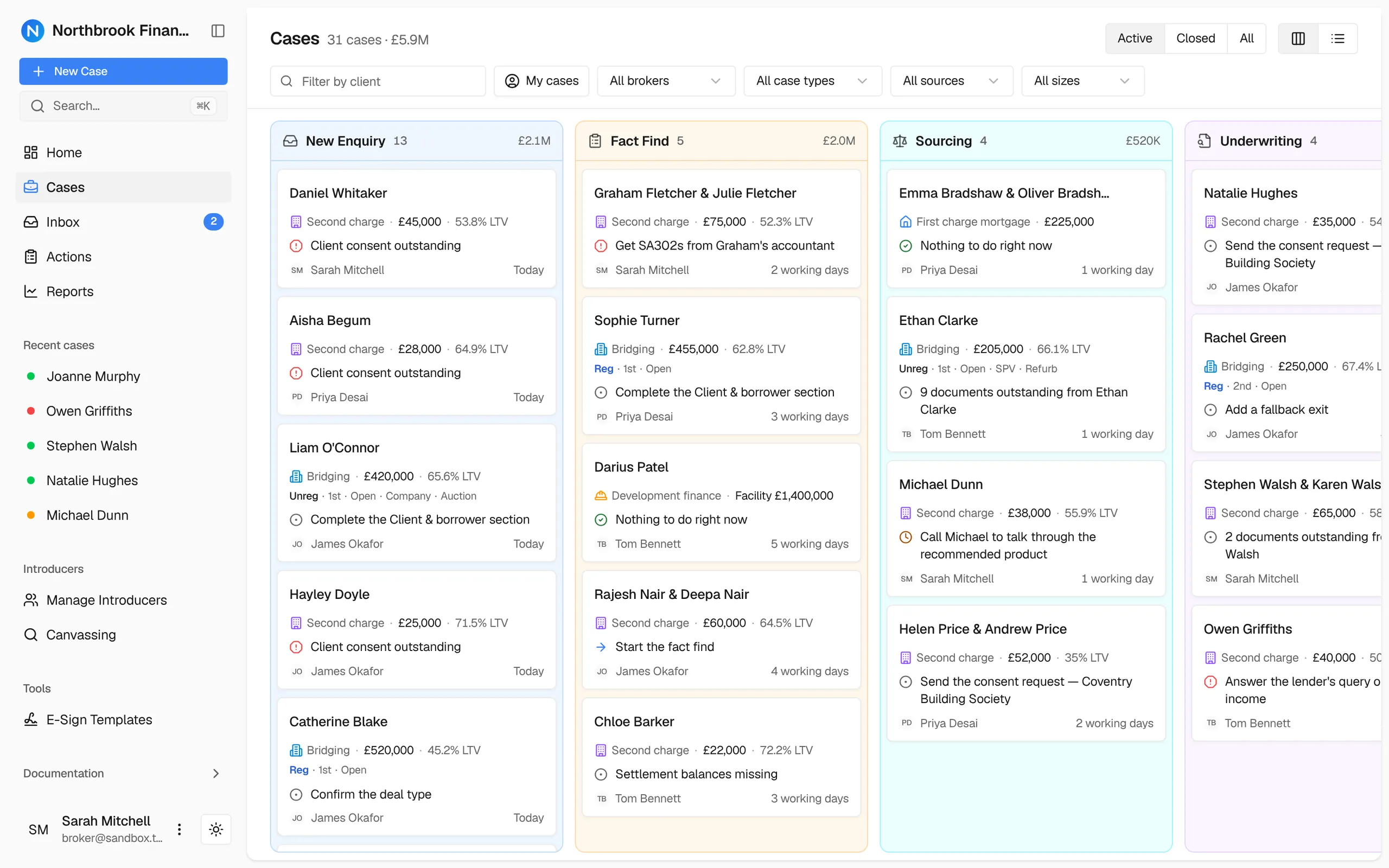
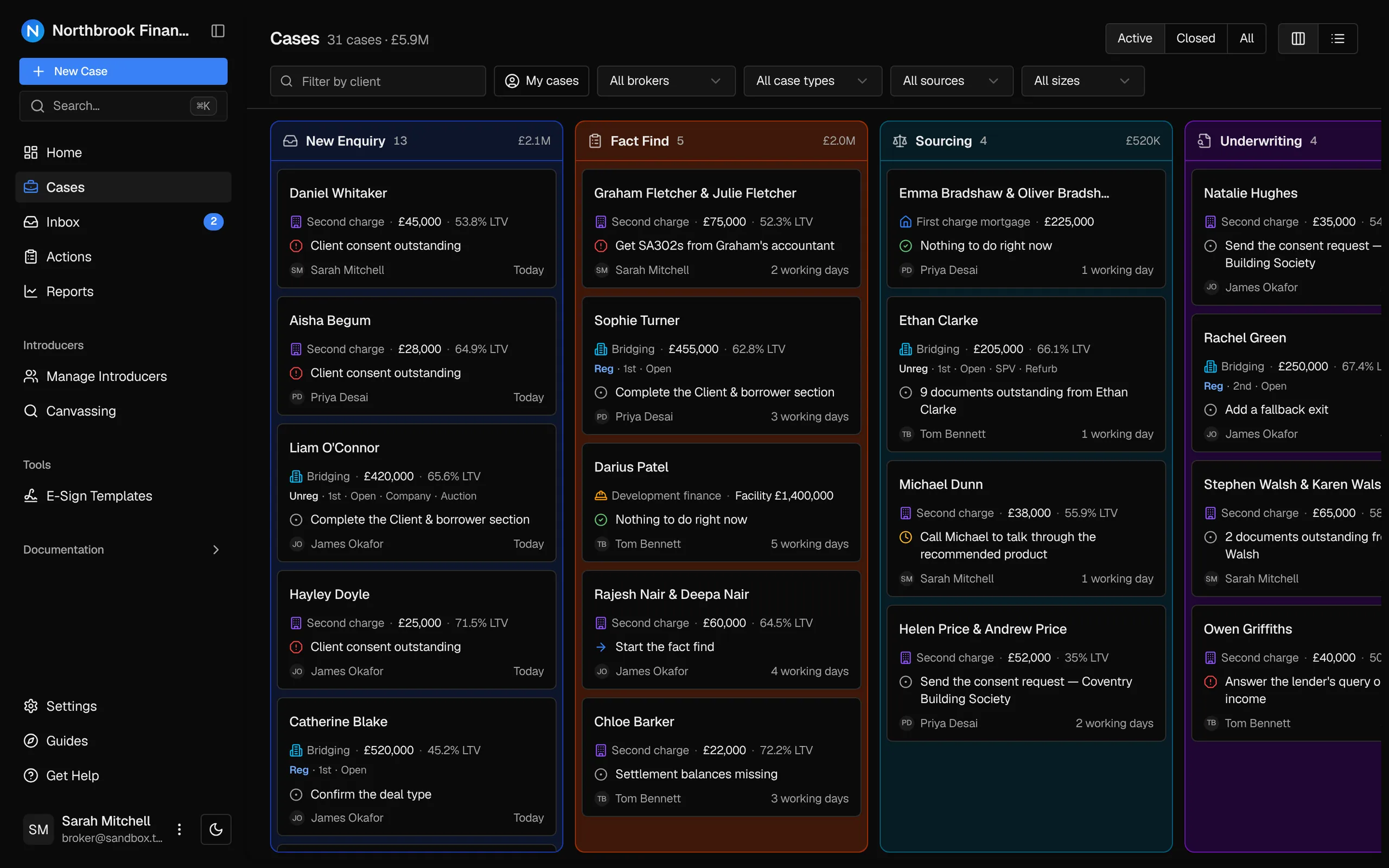
Every bridging case type
Every bridge, smooth from the first call.
Regulated or unregulated, auction, refurbishment, second charge or SPV: Archway has handling built in for every type of bridging case. Compliance is shaped to the deal from the get-go, so the case asks for exactly what it needs and the file is right first time. You stop chasing checklists and spend your time on the case and the relationships that bring the next one.
Secured on a home the borrower or their family lives in
Advised like the regulated mortgage it is.
What the case asks for and keeps:
- Needs, circumstances and affordability captured in the fact find
- The exit and a fallback exit recorded before you recommend
- The product illustration kept with the case
- Vulnerability and the client’s understanding noted on the file
- Suitability letter drafted from your regulated template
- Adviser sign-off before anything goes to a lender
FCA regulated
Regulated bridging falls under the FCA’s mortgage rules. Archway gives each requirement a place on the case; your firm stays responsible for the advice.
Open or closed?
On a closed bridge the confirmed exit date sets the timeline. On an open bridge, Archway asks for a fallback exit as well, so the case always has a plan B.
Archway supports your firm’s controls. It doesn’t replace adviser judgement or guarantee compliance.
Sample quotes for illustration. Lender availability is confirmed in your demo.
Quick quote and full quote
Quote on the first call. Firm it up on the same case.
Run a quick quote with lenders such as HTB, Shawbrook and MT Finance from just the loan, the property value and the term, while the client is still on the phone. When the deal and the exit are in, run full quotes on the same case. Nothing is rekeyed and nothing is lost between the two.
- Quick quote
- Indicative results from three details, so you can tell the client what’s possible straight away.
- Full quote
- Purpose, exit and interest treatment added, with net advance and fees to compare like for like.
- Retained, rolled or serviced interest shown clearly
- Every quote saved with the case for later review
- The chosen product carried into the suitability letter
Suitability letter
A bridging letter that already knows the deal.
The loan, term, product, exit strategy and fallback exit drop into your firm’s verified template, so the adviser starts from a near-complete draft instead of a blank page.
Your firm’s verified template
Letters start from a template your compliance team has approved, not from a blank page or a prompt.
The deal drops straight in
Loan, term, property, product, exit strategy and fallback exit insert as data chips from the case.
Every line stays editable
The adviser finishes the letter in a rich text editor and owns the wording that goes on file.
AI that helps you edit
Built-in AI can suggest clearer phrasing while you work. It never writes the letter.
Suitability letter
Bridging template · live case data
Bridging recommendation
Dear Client name,
You asked us to arrange a bridging loan of Loan amount overTerm to fund the Loan purpose ofProperty address.
We recommend Selected product at Monthly rate with interestInterest treatment. You plan to repay it by Exit strategy. If that is delayed, your fallback is Fallback exit.
AI can help you edit. It never writes the letter.
Adviser editBridging reporting
See your whole bridging book at a glance.
Pipeline value, LTV, time to completion and the exits behind every live case, so you know where the book stands and where it needs attention.
Live bridging pipeline
£0.00m
↗ 0%over the last 12 months
Average loan to value
0.0%
Across 11 live cases, gross of fees
Days to completion
↘ 7 days0avg
Cases with a confirmed exit
0 of 11
Exits with a fallback recorded
0 of 9
Valuations instructed
0 of 11
Sample data.
The broker stays in control
Fast deals, with a file that stands up.
Bridging is quick, but the record still has to show why the loan was right, why it is or isn’t regulated, and how it will be repaid. Archway keeps those decisions on the case as they happen, so a file review never starts with a hunt for evidence.
A stronger bridging file
Decisions kept in context.
- Exit strategy and fallback exit recorded before a recommendation
- Sourcing comparison and the selected product preserved on the case
- Valuation, legal and title progress visible to the whole team
- Lender conditions turned into actions with an owner and a date
- Adviser approval required before anything reaches a lender
- A full audit trail of who changed what, and when
Bridging CRM questions
Clear answers for bridging brokers.
We’ll confirm which lender connections are live for your firm during the demo. Working across second charge too? See our second charge CRM.
Bring us a live deal. We’ll run it in Archway.
Show us how your bridging cases move today, from enquiry to exit, and we’ll walk the same deal through Archway on the screens your team would use.